
Challenge
I was struggling to create professional videos of my 3D-printed products using a physical wooden turntable inside a lightbox. This manual workflow introduced critical bottlenecks:
- Sub-par Quality: The physical turntable produced shaky, inconsistent footage that failed to meet professional standards.
- Wasted Time: Spending hours calibrating camera gear and editing video simply wasn't justified for digital STL deliverables.
- Zero Scalability: Repeating this tedious physical pipeline for future product releases was completely unsustainable, making an automated digital studio app the obvious alternative.
Solution
To eliminate this tedious manual workflow, I built Rotater, a 100% client-side web application that turns any 3D model into professional, exportable product videos and GIFs directly in the browser within seconds.
The Physical Bottleneck: Manually recording the ice cream cone on a physical turntable highlighted immediate workflow friction. Perfectly centering the 3D-printed model on the rotating plate required extensive trial and error, and the resulting video still suffered from severe hardware shakiness. Operating within the tight, fixed boundaries of a physical lightbox meant any minor adjustment required re-calibrating the entire camera setup, making it completely unscalable for an expanding product line.
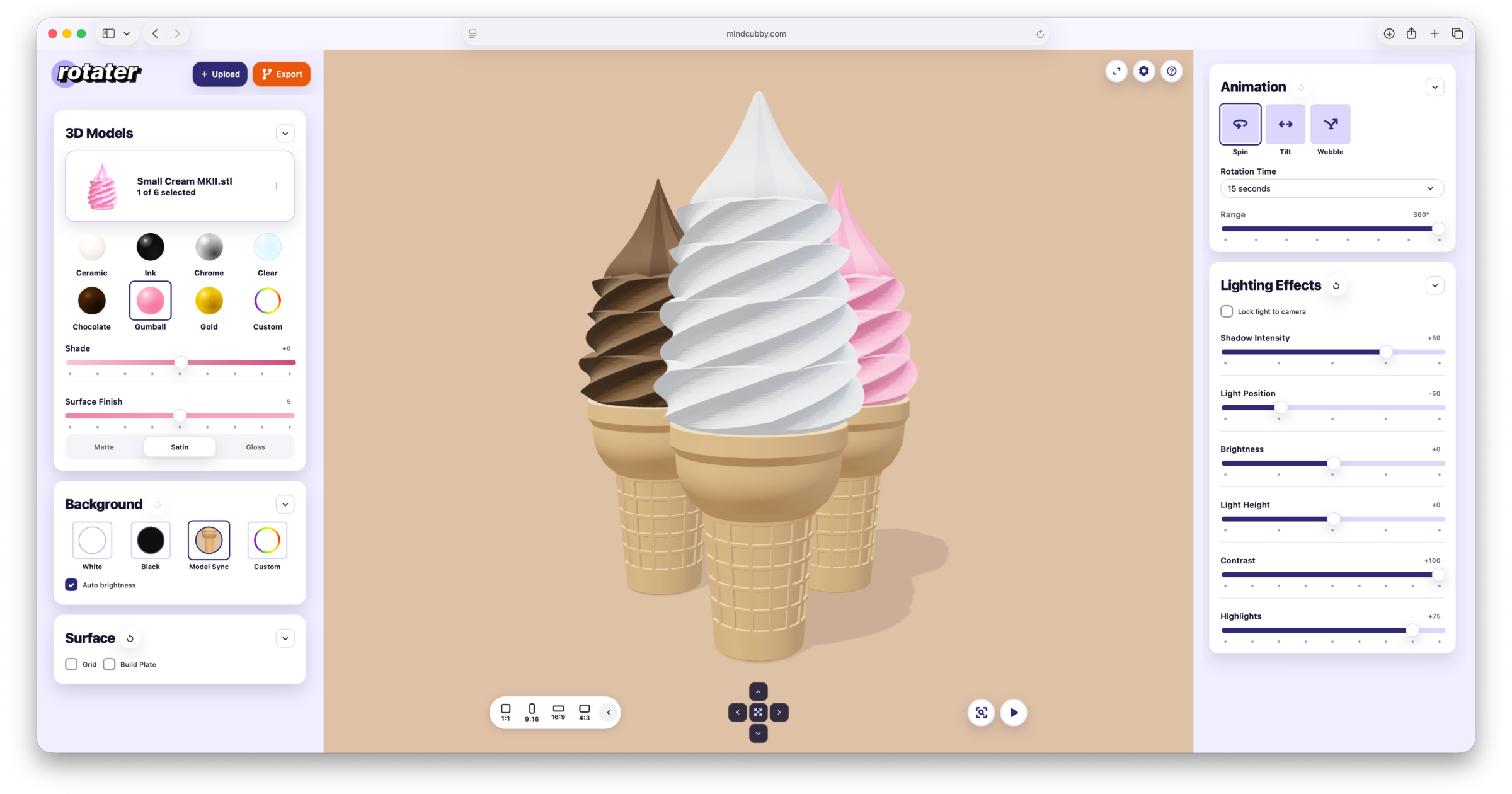
Translating physical studio gear into a digital interface required turning complex parameters into a highly predictable, visual control system. The application organizes lighting and camera variables into focused control cards to reduce cognitive load during asset creation, ensuring key interactive controls remain highly accessible:
- Precise Environment Control: Designed intuitive sliders for ambient light positions, shadows, and contrast to perfectly mimic a real-world lightbox setup.
- Per-Part Customization: Created independent material overrides, color selectors, and opacity sliders mapped directly to individual component groups to support complex multipart models.
- Always-Visible UI Cards: Grouped lighting parameters and rotation presets into structured structural panels to preserve layout consistency and eliminate hidden menus across desktop and mobile screens.
Comparing the physical recordings side-by-side with the Rotater application demonstrates complete output parity with zero hardware friction. By migrating the entire production pipeline into browser software, the interface elegantly replaces unpredictable physical workflow limitations with pristine digital assets:
- Flawless 360° Looping: Replaced the shaky, uneven manual spins of the turntable with mathematically precise, infinitely looping camera rotations.
- Environmental Parity: Leveraged software-controlled shadows, lighting vectors, and color parameters to seamlessly match the contrast and depth of a physical lightbox.
- Predictable Asset Scaling: Eliminated tedious setup trial and error, guaranteeing a stable, perfectly centered product showcase on every single export.
Results
By migrating a complex physical setup entirely into software, Rotater replaces a slow and manual workflow with an instant asset creation tool. Simulating a photography studio environment successfully unlocks infinite prototyping freedom with zero setup hassle.
- Eliminated an 11-Step Physical Workflow: Replaced a tedious physical setup of unfolding a lightboxes, cleaning dust, charging gear, fixing white balance issues, and airdropping files with a digital studio that eliminates time-consuming setup and post-processing.
- One-Time Setup for Fast Re-Exports: Solved the pain of design iterations by allowing creators to save and re-import all environment parameters via a project ZIP or shareable URL. If a 3D model changes later, users simply reload their settings, swap the model file using the Model Manager, and instantly re-export without rebuilding the scene from scratch.
- Infinite, Waste-Free Prototyping: Saved valuable filament and material costs by giving designers a digital sandbox to instantly test infinite combinations of colors, surface textures, backgrounds, and build plates before printing.
- Flawless Content Quality: Replaced physical printing flaws like wet filament bubbles, machine jitter, or stringing with a pristine digital twin. The app effortlessly handles tasks impossible in a real lightbox, like synchronized tilting, axis wobbling, instant aspect-ratio crop switches, and built-in ruler measurements for perfect social media loops.
Learnings & Next Steps
Learnings
- Unexpected QA Value: Rotating models in a 360-degree loop turned out to be an awesome way to catch file bugs. When testing a high-gloss metallic surface, the rotation instantly showed broken 3D planes and mesh errors that would have completely ruined a physical print.
- Leveraging 3D Capabilities with AI: Building this app proved I could successfully leverage advanced, real-time 3D capabilities right inside a standard web browser. Honestly, I probably wouldn’t have been able to build this app without AI assistance, which allowed me to quickly connect the powerful Three.js library directly to simple browser controls.
Next Steps
- Multi-Model Build Plates: Update the canvas to support freehand drag-and-drop controls so users can easily move objects around, arrange multiple parts, and build entire scenes on a single build plate.
- Expand Project ZIP Exports: Update the portable project settings ZIP file to bundle custom lighting setups and animation choices so everything reloads perfectly.
- Gather Community Feedback: Get the application into the hands of more makers and creators to collect real-world feedback and improve the workflow.
